OSHA & Workplace Safety
Sep 22, 2026
OSHA Ergonomics: Guidelines, Requirements and Workplace Best Practices
Key Takeaways:
OSHA does not have a standalone ergonomics standard, but employers can be cited under the General Duty Clause for failing to address known ergonomic hazards.
Musculoskeletal disorders account for roughly one-third of all workers' compensation costs, making ergonomics a critical financial and safety priority.
An effective ergonomics program includes proper workstation setup, employee training and regular assessments to reduce injury risk.
Simple ergonomic improvements, such as adjustable chairs, proper monitor height and scheduled breaks, can significantly reduce workplace injuries and lost productivity.
OSHA ergonomics refers to the set of guidelines, recommendations and enforcement mechanisms that the Occupational Safety and Health Administration uses to help employers design workplaces that fit the worker, not the other way around. According to OSHA, employers are responsible for adapting tasks, workstations, tools and equipment to reduce physical stress on a worker's body and eliminate potentially serious musculoskeletal disorders (MSDs). These disorders remain one of the leading causes of workplace injury, costing employers billions of dollars each year in workers' compensation, lost productivity and medical expenses.
As a former facilities manager responsible for overseeing OSHA compliance at a small company of 45 employees, I saw firsthand how quickly ergonomic issues can surface, even in a brand-new facility with new furniture. A few months after we moved in, employees began complaining of wrist and back pain. That experience launched my deep dive into workplace ergonomics and the practical steps employers can take to protect their teams.
This article breaks down what OSHA expects from employers, the most common ergonomic hazards and how to build an ergonomic workplace that reduces injuries and saves money.
What Is Workplace Ergonomics and Why Does It Matter?
Workplace ergonomics is the science of designing and arranging workstations, tools, tasks and environments so they fit the physical capabilities and limitations of the people who use them. Rather than forcing workers to adapt to poorly designed setups, ergonomics focuses on adapting the work to the worker.
When workplaces ignore ergonomic principles, employees develop musculoskeletal disorders. MSDs are injuries and disorders that affect the muscles, nerves, tendons, ligaments, joints, cartilage and spinal discs. Common examples include:
Carpal tunnel syndrome
Tendinitis
Rotator cuff injuries
Lower back disorders
Trigger finger
Epicondylitis (tennis elbow)
MSDs don't just cause pain for employees. They carry significant financial consequences for employers. The following table consolidates the key cost and impact data that every safety professional should know.
MSD Impact Metric | Data |
|---|---|
Share of workers' compensation spending | $1 of every $3 spent goes to MSDs |
Annual workers' compensation costs for MSDs | $15 billion to $20 billion |
Total direct costs annually | Up to $50 billion |
Percentage of all lost-workday injuries and illnesses | 34% |
Average recovery time for carpal tunnel syndrome | 28 days (more than amputation or fractures) |
These numbers make a clear case: ignoring ergonomics is one of the most expensive mistakes an employer can make.
Common Ergonomic Hazards and Risk Factors
Ergonomic hazards exist in virtually every workplace, from offices to warehouses to manufacturing floors. The most common hazards include:
- Repetitive motions such as typing, clicking a mouse or assembling parts
- Sustained awkward postures like hunching over a keyboard or craning the neck to hold a phone
- Forceful exertions including heavy lifting, pushing or pulling
- Vibration from power tools or heavy machinery
- Contact stress from resting wrists on hard desk edges or pressing against tool handles
- Static positions such as sitting or standing in one position for extended periods without breaks
These hazards often develop gradually. Workers may not notice symptoms until the damage is already significant, which is why proactive identification and correction are essential.
OSHA Ergonomic Guidelines and Employer Requirements
One of the most common questions safety professionals ask is whether OSHA has a specific ergonomics standard. The answer is no. OSHA does not currently have a standalone ergonomics regulation. However, that does not mean employers are off the hook.
OSHA addresses ergonomic hazards through several mechanisms. The agency provides voluntary ergonomic guidelines for specific high-risk industries, including meatpacking, poultry processing, shipyard work and nursing homes. OSHA also offers free eTools and resources, such as the Computer Workstations eTool, to help employers assess and improve workplace setups.
More importantly, OSHA expects employers to take the following steps to address ergonomic risks:
- Identify ergonomic hazards through workplace assessments and employee feedback
- Conduct workstation evaluations to ensure proper setup for each worker
- Provide ergonomics training so employees understand how to protect themselves
- Track injury and illness data to spot MSD trends early
- Implement corrective actions when hazards are identified
- Document all assessments, findings and improvements
Employers who take these steps proactively are far less likely to face enforcement actions and far more likely to maintain a healthy, productive workforce.
The General Duty Clause and Ergonomics Enforcement
Even without a standalone ergonomics standard, OSHA can and does cite employers for ergonomic violations under the General Duty Clause. Section 5(a)(1) of the OSH Act requires every employer to provide a workplace "free from recognized hazards that are causing or are likely to cause death or serious physical harm."
For OSHA to issue a citation under the General Duty Clause for an ergonomic hazard, the agency must generally establish three conditions:
- Either the employer or the industry as a whole must recognize the hazard
- The hazard must be causing or likely to cause serious physical harm
- A feasible and effective means of abatement must exist
This means that if employees are developing MSDs from known ergonomic problems and the employer has done nothing to address them, OSHA has the authority to issue citations and penalties. Employers should document their ergonomic assessments and corrective actions to demonstrate good-faith compliance efforts.
How to Build an Ergonomic Workplace
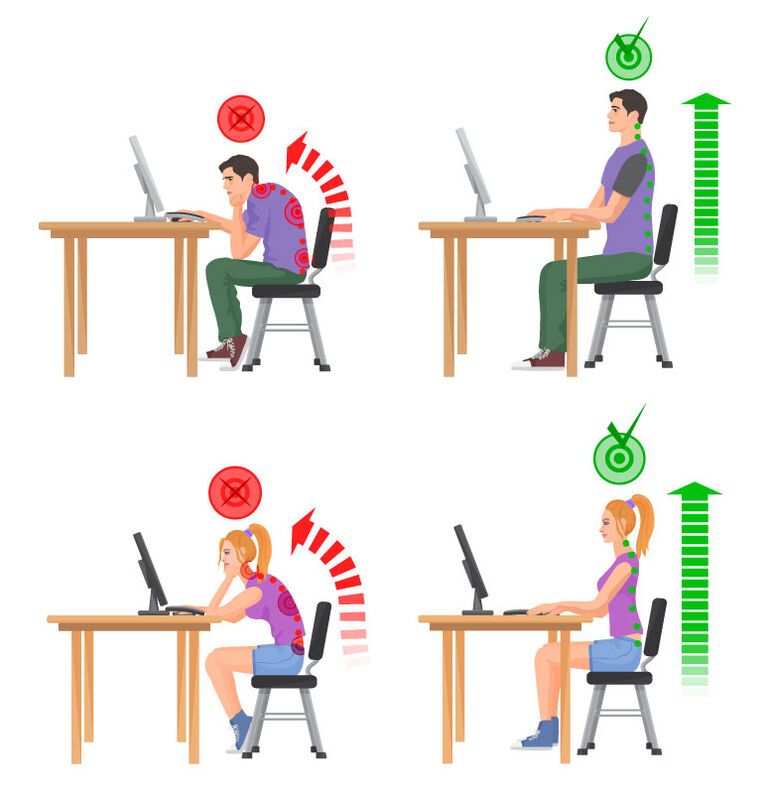
Moving from regulatory requirements to practical action, building an ergonomic workplace starts with proper workstation setup. The following checklist covers the essentials for office and desk-based environments:
- Adjust the chair so your feet are flat on the floor and your thighs are parallel to the ground. Use a footrest if the desk height cannot be lowered.
- Position the monitor so the top of the screen is at or slightly below eye level, approximately an arm's length away.
- Place the keyboard and mouse at elbow height so your forearms are parallel to the floor and your wrists remain in a neutral position.
- Use an articulating keyboard tray if the desk surface is too high for comfortable typing.
- Position task lighting to reduce glare on the screen and provide adequate illumination for reading documents.
- Follow the 90-90-90 rule: keep your elbows, hips and knees each bent at approximately 90-degree angles while seated.
- Practice the 20-20-20 rule: every 20 minutes, look at something 20 feet away for at least 20 seconds to reduce eye strain.
- Take regular breaks to stand, stretch and move throughout the day, especially if your work involves prolonged sitting or repetitive tasks.
These steps may seem simple, but they make a measurable difference. In my experience as a facilities manager, we brought in an ergonomist to work with each of our employees individually on such items as proper seating, how to align themselves at their desk, how to type without hurting their wrist or back and more. We spent an additional $8,000 on such items as desktop lighting and footrests. One employee required a variable desk where she could stand or sit depending on the time of day. I also learned there was such a thing as a left-handed keyboard.
Our receptionist was issued a headset to wear on the phone. She refused and continued using a handset with a cradle which caused her to crook her neck to the side and raise her shoulder to meet the handset. As you can imagine this was causing her a lot of neck and shoulder pain. I looked at the ergonomist visit and findings as a Job Safety Analysis (JSA). We determined that using a headset would protect our employee from MSDs. I explained to our receptionist that her headset is her Personal Protective Equipment (PPE) and we will require she wear her headset every day. After all, her headset protecting her from harm is the same as my hardhat protecting me from harm while on our construction site. Twoweeks after she started using her headset she realized that the pain in her neck and shoulders was gone.
The Business Case for Ergonomics Training
An additional $8,000 may sound like a lot of money to spend on chairs, headsets and keyboards. However, consider the cost of workers' compensation claims or lost time and production while your employees are out having surgery and recuperating. On average, it takes workers 28 days to recover from carpal tunnel syndrome - that's more time than workers need to recover from amputation or fractures. MSDs account for 34% of all lost-workday injuries and illnesses. Consider the big picture. Don't be penny wise and dollar foolish. You could save both human and financial resources simply by working with an ergonomist.
But equipment alone is not enough. Ergonomics training teaches employees how to set up their own workstations, recognize early warning signs of MSDs and use proper body mechanics throughout the day. Without training, employees may use even the best equipment incorrectly, as the receptionist example demonstrates.
Organizations that combine workstation improvements with ongoing education see the greatest reductions in injury rates and workers' compensation costs. Pryor Learning offers OSHA and workplace safety training designed to help teams at every level understand their responsibilities and take practical steps to create safer work environments.
![Negativity in the Workplace: How to Deal With It [Video]](https://www.pryor.com/dw/image/v2/BKXV_PRD/on/demandware.static/-/Sites-PryorLearning-Library/default/dw5e5dd762/images/blog/negativity-in-the-workplace-how-to-deal.jpg?sw=768&sfrm=jpg)