 FAQs
FAQs
We’re here to help.
Here you can find answers to common questions about Pryor Learning and our services. If your issue is not addressed in the list at right, please reach out to us using one of the contact forms below. Our Customer Service Department will be in touch within 1-2 business days. If you have a more urgent question, reach us via live chat, give us a call at 1.800.780.8476 or email us at customerservice@pryor.com.
SEMINAR INFORMATION AND PURCHASES
FINDING THE RIGHT SEMINAR
If your organization is tax exempt, please email your tax exempt certificate to pryortax@pryor.com or send by fax to 913-967-8849 referencing your confirmation number. The tax amount will be deducted from the invoice(s) once we have received your exemption certificate.
Contact Meeting Planning at pryor.wufoo.com/forms/venue-request-for-information/
Please contact our Workforce Training Solution department at 1.800.944.8503 for more information.
The fastest way to find the seminar you are looking for is to go pryor.com. Find all available live virtual seminars and in-person events here. You can also do a search by seminar using the advanced search tool on the upper right hand side of the home page. For further assistance contact the Customer Service Department at 1.800.905.8456 (Monday-Friday, 8am-5pm CST)
United States:
PO Box 738002
Dallas, TX 75373-8002
Canada:
Lockbox#: 12579
PO Box 12579, Station A
Toronto, Ontario M5W 0K5
Checks are made payable to PRYOR LEARNING LLC
Billing Address:
United States:
PO Box 738002
Dallas, TX 75373-8002
Canada:
Lockbox#: 12579
Transit No. 00012
Bank No. 0270
PO Box 12579, Station A
Toronto, Ontario M5W 0K5
Fred Pryor Seminars/CareerTrack, divisions of Pryor Learning offers;
An email with access to your seminar resources will be sent 10 days and again 3 days before the seminar date.
The email includes a link to a downloadable seminar workbook which you can use for notetaking during the event or choose to print. Printing is optional and not required to follow the seminar.
To download the workbook, click the blue button on the resource page.
Please Note: The workbook is available for a limited time. Be sure to download and print prior to the expiration date located below the download button.
To print continuing education or attendance certificates for your personnel/personal files, click here.
You may purchase most courses and products online through the shopping cart. Workforce Training Solutions courses are not available for purchase online. Please contact a training consultant 1.800. 944.8503 or email us at pryoronsite@pryor.com.
If you do not have an item number or would like to browse our courses and products, add the item you would like to purchase to your shopping cart as you browse. Once you have completed your shopping, you may purchase your items online by credit card.
We accept American Express, Discover, MasterCard or Visa to purchase courses and products.
Here are a few tips for ensuring your purchases are processed correctly. First, make sure that you enter all of the billing information correctly, including the phone number (with area code), zip code and country. If you leave any of these items blank, your transaction may not be approved. Also, when you enter the credit card information, the account number and name/address must be associated with your card. For example, if you are using a corporate card that is billed to your company but you enter your personal address as the billing address, the transaction will not be approved because the addresses do not match.
For Additional assistance call the Customer Service Department at 1.800.780.8476.
All of our seminars are 100% SATISFACTION GUARANTEED. If for any reason you are dissatisfied, send us an email at customerservice@pryor.com within 30 days of attending the seminar stating the reason you were not satisfied, and we’ll arrange for you to attend another or receive a refund. Please note, Pryor Learning will only refund the amount paid to this organization.
Our training goal is to provide quality business training and professional development materials that meet your needs. If for any reason you are dissatisfied with your purchase, return it within 30 days of receipt with a copy of your invoice and completed return form and you will receive an alternate product of your choice or a full refund (minus shipping and handling charges) — GUARANTEED. This policy includes all audios, downloadable products, and books. Software must be returned unopened. (Full refunds exclude all shipping and handling fees.)
Yes, we practice safe and secure ecommerce. When credit card information is requested, we utilize a credit card authorization company for secure SSL encryption. This ensures that your credit card number is never sent over the Internet unencrypted. Once it is encrypted, no one except the credit card authorization company can decrypt it. Your credit card number is never displayed on our site. Also, your personal data (such as your address, email and billing information) are stored in a server safe within the Pryor Learning database. Only those with proper authorization can view this data.
You will receive your product within 10 business days from the time of your purchase/payment.
NOTE: PO Boxes will not be accepted for product deliveries. Please, provide a street address.
Lunch and parking are not included, and there are usually two breaks. If you need directions to the seminar or information about parking, you may contact the seminar facility directly at the address and phone number located in your confirmation email, or call the Customer Service Department at 1.800.780.8476.
No. We do not allow any audio or video recording of our seminars.
Yes. You’ll find an interesting selection of books, software and other training solutions. You can purchase at special seminar-only pricing. Plan ahead. We gladly accept checks or credit cards.
At Pryor Learning, we strive to accommodate your needs. Please contact The Customer Service Department for assistance at 1.800.780.8476.
The Customer Service Department will notify you by phone, fax, email and/or mail if any changes are made to your scheduled seminar. Be sure to add customerservice@pryor.com to your email address book so you are sure to receive these messages. You may confirm your seminar location at any time by keying the event number in the search bar at www.pryor.com.
We appreciate that this is an important investment for you and your company and would like to accommodate your needs the best we can. Prior to the event you may transfer your attendance to a future session or send someone to take your place. If you are unable to attend, you will be responsible for the entire fee.
Check-in time for most one- and two-day seminars and conferences is at 8:30 am. The programs start at 9:00 am and end at 4:00 pm. Most morning sessions for half-day seminars begin check-in at 8:30 am, with the program beginning at 9 am and ending at noon. Afternoon sessions for most half-day seminars start check-in at 1:00 pm, with the program beginning at 1:30 pm, and ending at 5:00 pm.
Check-in time for the five-day OSHA 30-Hour Compliance Course begins at 8:00 am, Monday through Friday. The program starts at 8:30 am and ends at 4:00 pm each day.
Attendees must be at least 14 years of age or older to attend. If an attendee is less than 18 years of age they must be accompanied by an adult. Any attendee of approved age attending a seminar will need to register and pay for attendance.
Attendees must be at least 14 years of age or older to attend. If an attendee is less than 18 years of age they must be accompanied by an adult. Any attendee of approved age attending a seminar will need to register and pay for attendance.
Yes, call The Customer Service Department at 1.800.780.8476 and enroll your guest today.
On the day of the seminar, your name will be listed on the roster; it is not necessary to bring any paperwork. You may wish to bring a pen and paper for notes. Please consider layered clothing as heating and cooling conditions may vary.
Your VIP number is found on the bottom left of the emails that you receive. The express code is a 6 digit number written near the word ‘express code’. It will also be along with the VIP number on the email correspondence.
To delete your mailing address, call the Customer Service Department at 1.800.905.8456 or email at customerservice@pryor.com.
NOTE: Promotional materials are queued to deliver well in advance, so it may take up to 16 weeks for deliveries to completely cease.
Continuing education credit is available to the registered participant who meets attendance and participation requirements. CEUs/certificates of completion cannot be issued to non-registered individuals, including those participating as part of a group viewing.
SEMINAR ATTENDANCE INFORMATION
Most seminars average 50 learners.
We will use an interactive learning platform called Kahoot during your training for knowledge checks, polls and engagement throughout the day.
It’s free to use and easy to join through whatever method you prefer. If you have a moment, please test your device in advance so you are ready for the day.
- On your desktop computer, go to kahoot.it and enter the PIN from the trainer’s slide provided during your event.
- There are multiple options for mobile device access:
- In your browser, go to Kahoot.it.
- Scan the QR code on the trainer’s slide.
- Download the Kahoot app (recommended for repeat attendees).
VENDOR INFORMATION AND TAX QUESTIONS
VENDOR FORMS AND TAX RATES
DUNS# 103 104043
If you are needing a completed W-9 Form for your accounting purposes, please print the attached image file. If you have any questions, please contact the Customer Service Department by calling 1.800.780.8476 or by email at customerservice@pryor.com. Printable image file of W-9 Form
Pryor Learning’s Federal Tax ID# is 92-2053228 (FEIN).
The current GST/HST tax rates are: 13% for Ontario, 15% for Newfoundland, Labrador, New Brunswick, Nova Scotia and Prince Edward Island. All other provinces will be charged the GST rate of 5%.
PryorPlus
Google Chrome:
- Click the three horizontal dot icon on the far right of the address bar.

- Click on Settings, scroll to the bottom and click the Show Advanced Settings link.

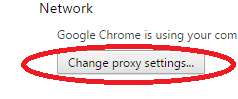
- Click on Open proxy settings
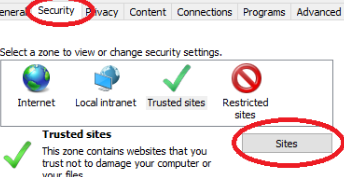
- Click the Security tab > Trusted Sites icon, then click Sites.
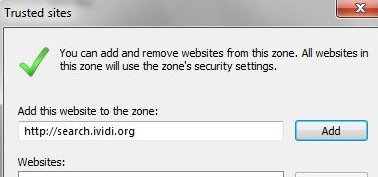
- Enter the URL of your Trusted Site, then click Add.
- Add as many sites as you need to. Once finished, click Close.
Internet Explorer:
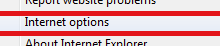
- In Internet Explorer, click Tools (Gear Icon), click Internet Options, and then click the Security tab.
- a.

- b.
- c.
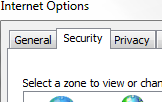
- In the “Select a zone to view or change security settings” box, click Trusted Sites, and then click Sites.
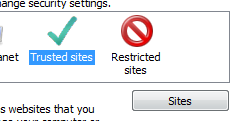
- Enter the URL of your Trusted Site, then click Add.
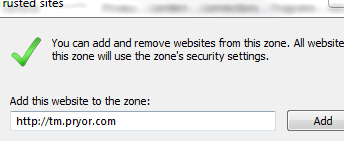
- Add as many sites as you need to. Once finished, click Close.
Chrome
- In the browser bar, enter: chrome://settings/clearBrowserData

- Select the items you want to clear (e.g., Clear browsing history, Clear download history, Empty the cache, Delete cookies and other site and plug-in data).
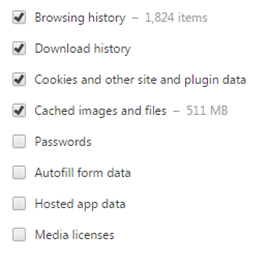
- Select “Obliterate” or “Time Range” the following items from: drop-down menu, you can choose the period of time for which you want to clear cached information. To clear your entire cache, select the beginning of time.

- Click Clear browsing data.
Internet Explorer 8 and higher
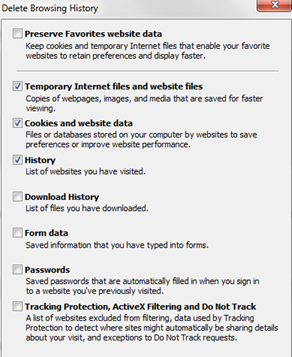
- From the Tools (Gear Icon) menu, select ‘Safety’, then ‘Delete browsing history’.

- If the menu bar is hidden, press Alt to make it visible.
- Deselect Preserve Favorites website data, and select:
- Temporary Internet files or Temporary Internet files and website files
- Cookies or Cookies and website data
- History
- Click Delete
Internet Explorer 7
- From the Tools menu in the upper right, select Delete Browsing History

- To delete your cache, click Delete files.

- To delete your cookies, click Delete cookies.

- To delete your history, click Delete history.
- Click Close, and then click OK to exit.
Firefox
- From the Tools or History menu, select Clear Recent History.
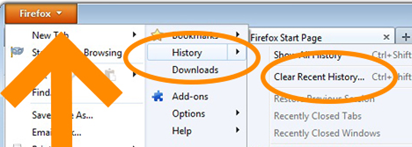
- If the menu bar is hidden, press Alt to make it visible.
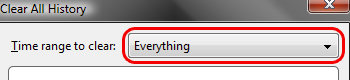
- From the Time range to clear: drop-down menu, select the desired range; to clear your entire cache, select Everything.
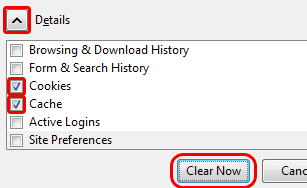
- Click the down arrow next to “Details” to choose which elements of the history to clear. Click Clear Now.
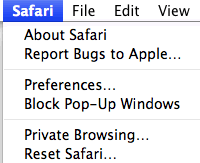
Safari
- From the Safari menu, select Reset Safari
- From the menu, select the items you want to reset, and then click Reset.
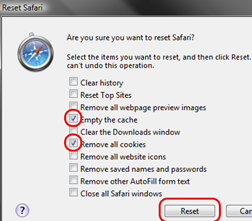
- As of Safari 5.1, Remove all website data covers both cookies and cache.
Android
- Start your browser.
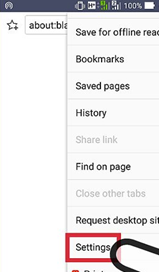
- Tap Menu, and then tap More.
- Select Settings.
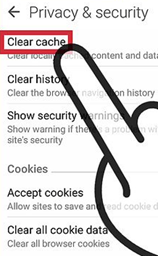
- Under “Privacy settings”, select Clear cache, Clear history, or Clear all cookie data as appropriate, and then tap OK to accept (or Cancel to cancel) the deletion.
Mobile Safari for iOS (iPhone, iPod touch, iPad)
- To clear cache and cookies, and history.
- From the home screen, tap Settings, and then tap Safari.
 OR
OR  THEN:
THEN: 
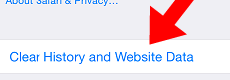
- At the bottom of Safari’s settings screen, tap clear browsing history and website data. Confirm when prompted.
Opera
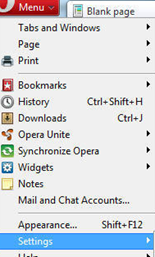
- From the Opera menu, select Settings, and then Delete Private Data…

- In the dialog box that opens, select the items you want to clear, and then click Delete.
Notes: Each time you access a file through your web browser, the browser cache stores it. By doing this, the browser doesn’t have to retrieve new files (including any images) from the remote web site each time you click Back or Forward. You should periodically clear the cache to allow your browser to function more efficiently.
A cookie is a file created by a web browser, at the request of a website, that is then stored on a computer.
These files typically store user-specific information such as selections in a form, shopping cart contents, or authentication data. Browsers will normally clear cookies that reach a certain age, but clearing them manually may solve problems with websites or your browser.
A browser’s history is a log of sites that you visit. When you use a browser’s Back button, you are moving back one entry in the history log. Browsers will normally clear the history at regular intervals, but you may want to clear it manually for privacy.
Pryor+ members are given permissions to print and email pages in PDF format from most of the eBooks, but not all. Courses that offer email options, often have a cap of 59-99 pages per launch. Meaning you would need to launch the course a number of times to get the entire eBook. This design is to encourage users to only print or email the sections they find relevant.
Please see attachment for instructions.
- How to print an eBook (1 MB)
These errors are typically caused by an organizations network security and firewall settings. Organizations are constantly making changes to improve the security of their network, and sometimes that means filtering the java script used to run certain videos.
We recommend contacting your companies IT Dept. to have them add the URL’s listed below to the companies trusted sites list.
Please note they will also need to completely clear all cache and cookie data, following these changes.
http://quiz.atomiclearning.com
http://link.videoplatform.limelight.com/
http://s2.cpl.delvenetworks.com/
http://campus.ej4.com
Homepage
http://svl.bizlibrary.com/
http://s31a5s5icxmbyh.cloudfront.net
http://d3cixdoymhalq4.cloudfront.net
For more information on how to add these URL’s, please visit this URL:
https://pryor.zendesk.com/hc/en-us/articles/115001812843-Adding-sites-to-your-Trusted-Sites-List
Once you have Internet Explorer open:
- Click the “Tools” button (gear icon in the top right corner)
- Click “Internet options”
- Click the “Security” tab
- Now click on “Trusted sites” and then click on the “sites” button
- Enter the Website URL and click on “Add”
- When you are finished, click on “Apply”, then “Ok”
- Open Google Chrome.
- Open the link you want to add: www.pryor.com/trainingrewards/
- Copy the link.
- Click the Chrome Menu icon on the far right of the Address bar (the three horizontal lines)
- Click on Settings
- Scroll to the bottom and click the Show Advanced Settings link.
- Scroll to the Network Heading and click on Change proxy settings
- Click the Security tab > Trusted Sites icon (click the big green checkmark)
- Click Sites
- Paste the URL of your Trusted Site, then click Add.
- Click Close > OK.
- Close the browser and launch again.
- Try logging in again.
For Google Chrome:
- At the top right, click More
Settings.
- At the bottom, click Advanced.
- Under “Privacy and security,” click Content settings.
- Click Popups.
- At the top, turn the setting to Allowed or Blocked.
For Internet Explorer:
- Open Internet Explorer
- Click the Tools button
- Select Internet Options
- Select Privacy Tab
- Uncheck “Turn-On Pop up Blocker”
- Apply
- Ok
For Firefox:
- From the Tools menu, select Options.
- From the Content tab, uncheck Block Popup Windows and click “OK”.
For Safari:
- From the Safari menu, make sure Block Pop-Up Windows is unchecked.
For iPhone:
- Settings
- Safari
- Block Pop ups
To qualify for a certificate, online courses must meet the following criteria:
- 15 minutes or longer
- Track modules watched and/or contain a post-test or quiz
- Completed within one year of registration
To access your certificate, visit the My Completed Training page, find the course, and under the “your history with this course” select Certificates.
Certificates for eligible OnDemand courses are available on the Accounts and History page immediately upon successful completion. For live seminars, please allow 10 days after your event has ended for your certificate to be available at www.pryor.com/certificate.
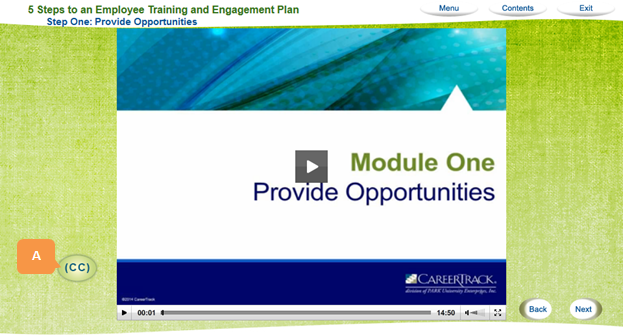
- To access closed captions, click the CC [A] button within the media section of the module.
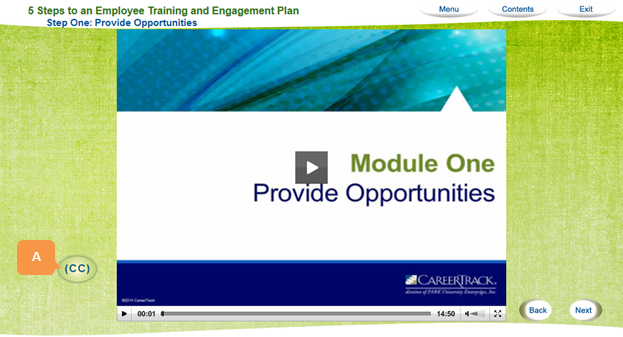
- NOTE: In some instances, the “CC” will live in the bottom bar. In this case, simply select it, then select which language you prefer.
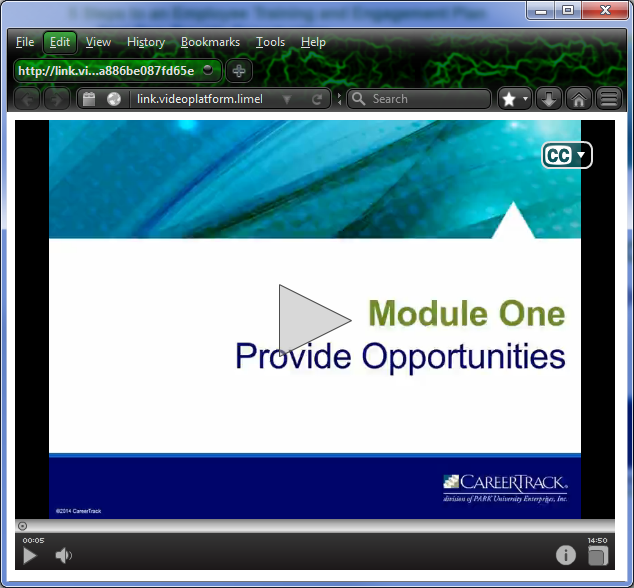
- The video will open in a new window, then click the CC [A] dropdown in the top right-hand corner and select English [B]. The closed captioning will then appear at the bottom of the Player Screen [C].
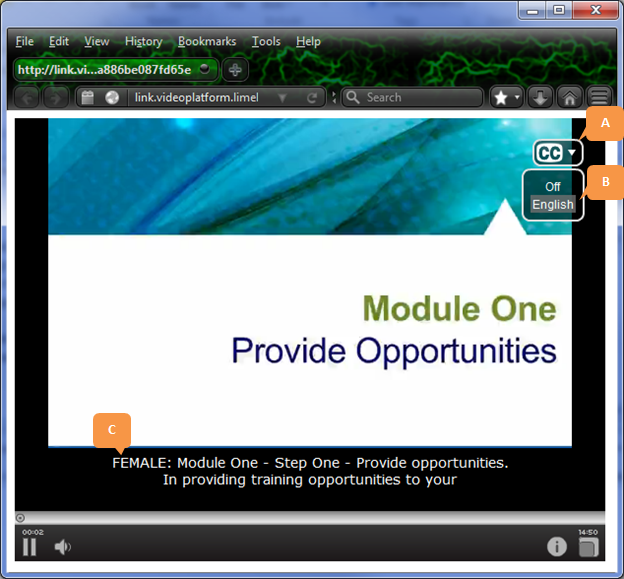
- If a video is blurry, click the CC button [A] on any media page in the course.
- When the video opens in a new window, the video quality should have improved.
If you’re still experiencing video quality issues, please contact The Customer Service Department. Our representatives will contact you as soon as possible.
In-app purchases through iOS can be viewed, renewed or canceled via the Subscriptions tab found under Settings on your Apple device. Please note that in-app purchases made through the Apple app store are not visible or accessible through Pryor’s platform.
WEBINARS
GENERAL TROUBLESHOOTING
A Webinar allows registered users to participate in the event using their computers to view and listen to the presentation. Users may choose to listen to the audio portion of the presentation via phone or computer.
Upon registering for a webinar, you will receive a confirmation email. You will receive an email containing your date and time, webinar instructions, live event information, link, and other relevant information. You will receive multiple reminders, starting from 7 days up to an hour before your webinar.
On the day of the webinar, connect to the webinar using the live event link (URL included in the e-mail you receive). Log in at least ten minutes prior to the event to avoid delays.
For the audio portion, simply turn on your computer speakers or plug headphones into your computer. You may choose to call in using the number provided in your confirmation and reminder emails if preferred. You will then need to provide your Access Code (as entered on the web). You will be connected to the conference but placed on hold until the conference begins.
Yes. You pay a single registration for multiple participants. All participants must view the Webinar in the same room and on the same computer. We encourage you to invite others within your organization to participate in the Webinar for one low registration price.
Downloadable links become available within 3-5 business days after the air date of the live event. At that time the link will be shipped via automated email to the email address on file with the order.
If you still have not received your webinar link after five business days please contact The Customer Service Department at 1.800.905.8456.
If you become disconnected during the Webinar or have difficulty connecting, contact The Customer Service Department at 1.800.905.8456.
TECHNICAL SUPPORT
GENERAL TROUBLESHOOTING
Cause for this Error:
This error is generated by the timing on your PC is off by four or more minutes. This confuses our server when it tries to record your timestamp
Please follow the below instructions if you are receiving this error:
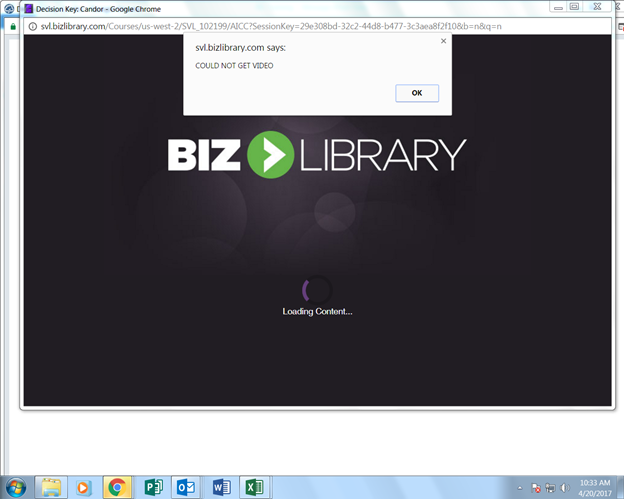
Solution:
First confirm if the time on your phone and your PC’s time match. If they do not match, please change your computer time to match your phone time, and launch this course in a new web browser.
Often times if you are experiencing issues with “loading” or “viewing videos” multiple types of videos, this may mean your organization has enabled network security using a firewall.
We recommend contacting your company’s internal IT Department to have them add the URL’s listed below to the companies trusted sites list.
- http://beauditsecure.com
- *.tripletech.biz
- https://web.b.ebscohost.com/eli/ebookviewer
- *.ej4.com
- *.thinkzoom.com
- api.box.com
- campus.ej4.com
- dl.boxcloud.com
- https://content-contentserver-ms-as-prod-us1.hsiplatform.com
- pryor.com
- https://cloud.scorm.com
- pryorcc.pryor.com
- comms.pryor.com
- *.brightcove.com
- players.brightcove.net
- https://edge.api.brightcove.com/
- https://indd.adobe.com/
- https://Pryor.oncourselearning.com
- seminarcdn.pryor.com
- mediacdn.pryor.com
- contentcdn.pryor.com
- pryorcdn.pryor.com
- static.zdassets.com
- v2.zopim.com
- transactional.pryor.com
- em.pryor.com
- go.sparkpostmail1.com
- go.sparkpostmail2.com
- wufoo.com
- synassets.s3.amazonaws.com
- www.Syntrio.com
- assets.syntrio.com
- www.google-analytics.com
You may need to clear the activation data from your system and re-enter it clean.
- Double-click the local disk (C:) folder, from the “Computer” or “My Computer” menu.
- Double-click the “Users” folder.
- Double-click the “Public” folder.
- Double-click the “Ticket” folder.
- Right-click the product name.
- Select Delete from the drop-down menu.
- Return to the product folder and re-launch the “.exe” or “Application” file.
Once this launches, you will be prompted to re-enter your activation code, select “Activate Now”.
This error is caused by missing Java components.
In order to install this USB you will need to download “Java SE Runtime Environment 7u79” by using the link below:
https://www.dropbox.com/s/dg8qiz52adosyno/jre-7u79-windows-x64.exe?dl=0
Once installed, you can continue activation and input your serial number or run the program if it is already installed.
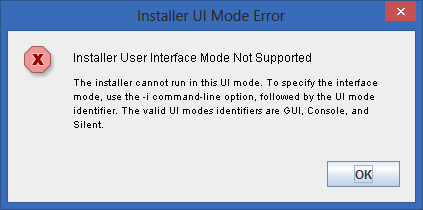
If you are using a newer operating system (Windows 8 or 10), it is possible you may receive the “User Interface or UI” error. This means you will need to install it in compatibility mode.
Please see the directions below for performing this function:
- Left-Click your Start menu
- Click on Computer or My Computer. This will open your computer’s files.
- Double-click the following folders: Local Disk (C:) folder, Program Files (x86) folder, CareerTrack.
- This should bring up a folder with the product name, double-click this folder.
- Right-click the product name with the CareerTrack logo.
- From the drop-down menu click Properties.
- Click the Compatibility tab.
- Check the box next to Run this program in compatibility mode and select Windows XP (Service Pack 3).
- Under Privilege Level, check the box by Run this program as an administrator.
- Click Apply and then OK.
- Double-click to re-launch the course.
Please complete this form with any technical support questions you have regarding software purchased from pryor.com.
Please complete this form with any technical support questions you have regarding software purchased from pryor.com.
Upon opening the live chat, you will see the word “options”. Select this and click on “end chat”.
DOWNLOADABLE PROGRAMS
- Once you have clicked, or copied and pasted the link provided in your email, a web viewer version of these eBooks will be opened automatically.
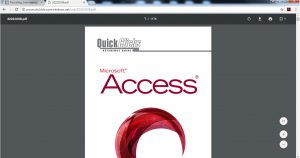
- In order to save this eBook as a PDF, you will need to select the download icon near the top right of the screen.
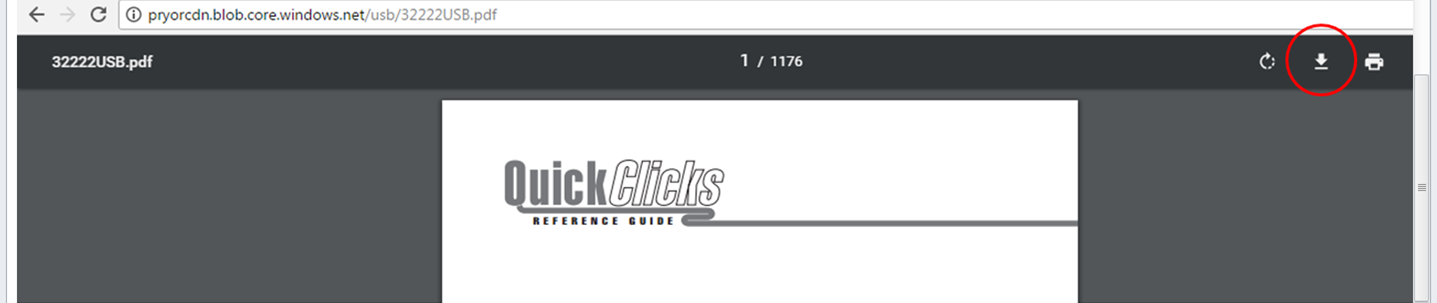
- After you have selected to download this PDF, you will then need to determine a designated area or folder for this eBook. We recommend renaming this file and saving to your desktop.
1. Locate the email that was sent containing the Downloadable link.
2. Click this link to begin download or copy and paste the provided URL into your web browser.
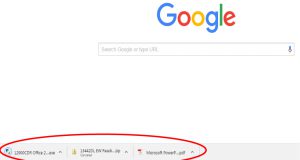
3. While the file is downloading, you may create a folder on your desktop to place in.
4. After the file has completed downloading, you will want to retrieve it from the “Downloads” folder on your computer, and move it into the desktop folder you created.
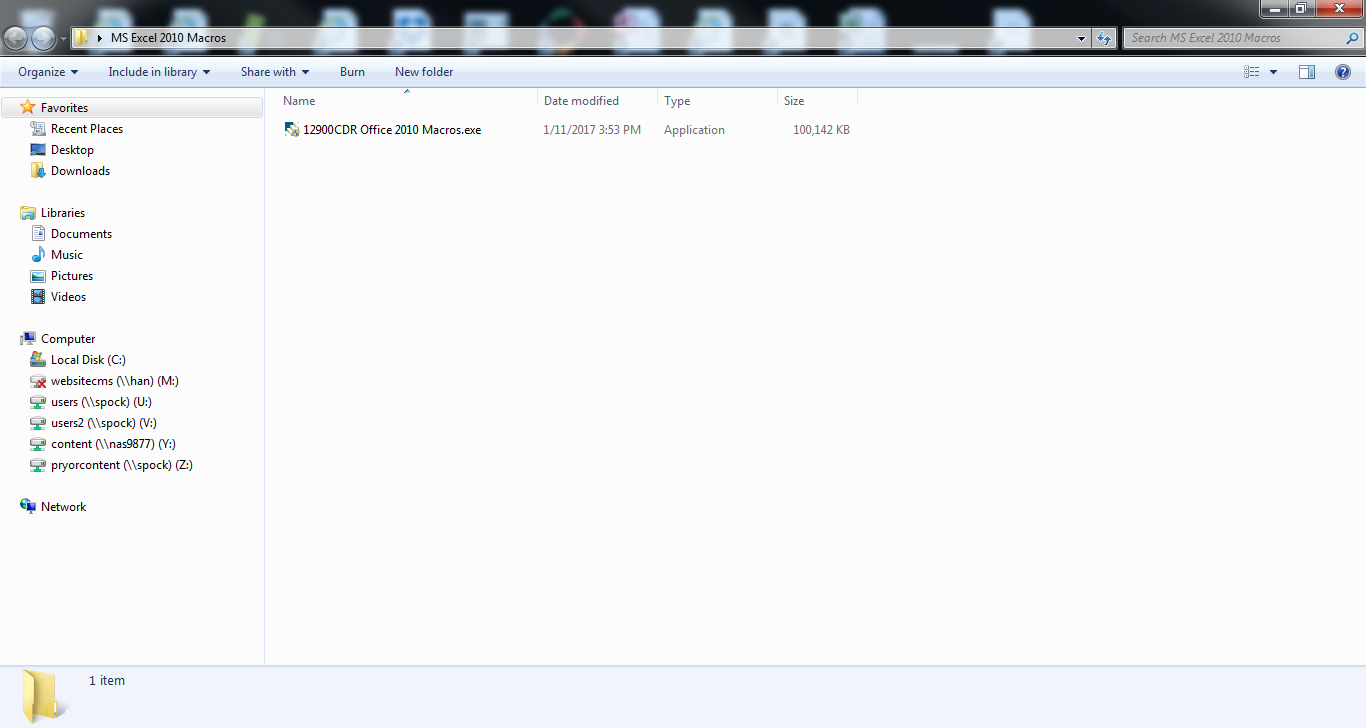
5. Open your folder, there you will find your downloadable file. Depending on the program, this file may be in “zipped” format, you can “extract” or “unzip” this folder.
6. Next you will want to launch the program using its application (Audio, Video, and Webinar programs will not have an application to launch, but rather a file to play), usually followed with a “.exe” extension or categorized as “application” under the “file type” column to the right.
7. Proceed to install the program initiated by “Install Anywhere”.
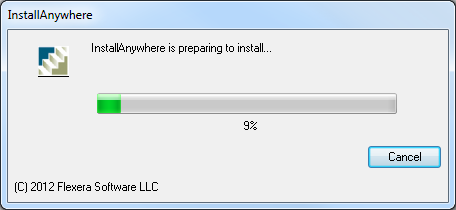
8. During installation, you will be asked to choose a location for the program. ALWAYS select the “browse” option and place it in the folder you created on the desktop.
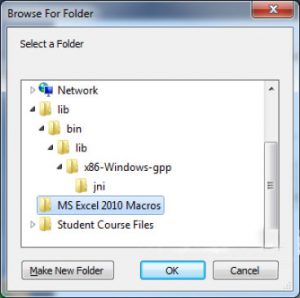
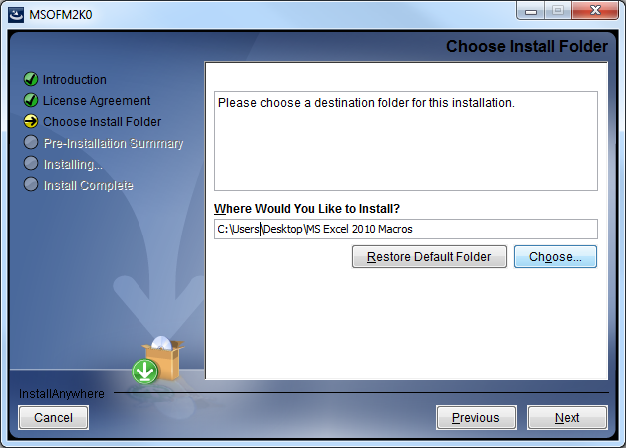
9. After you have successfully completed your installation, if applicable you will be prompted to input your serial number and registration information.
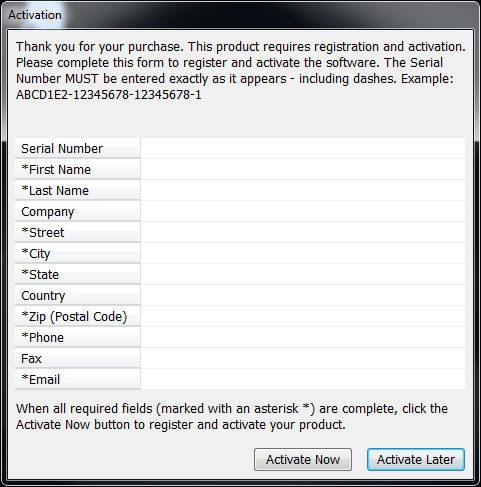 –
–
10. The program will then automatically launch.
Some of the audio tracks and training videos are composed of large files. The speed of download will depend on your system’s speed and memory availability. For best results, it is recommended that you do not pause the download while in the process. Once the file is downloaded, you can save the product to an easily accessible location (such as your desktop).
The downloadable products are a single user license with a maximum of two activations.
- When you click ‘here’ from your product email, a blank browser window will open. The product file will begin downloading immediately in the lower left-hand corner of the browser.
- You can also download your product by copying and pasting the full link into a browser window, again, the product will begin downloading immediately in the lower left-hand corner of the browser. For best results, please do not pause the download prior to completion.
- Once the download is complete, depending on your computer settings you will be prompted to install. If you are not prompted, you can locate your download file in the “Downloads” folder located under this PC/ Computer in the file explorer, or in the “Finder” if you are using a Mac. It is recommended that you save the product to an easily accessible location (such as your desktop) for future use.
- If the download is still not working please contact the Customer Service Department at 1.800.905.8456 (Monday-Friday, 7am-7pm CST)
Problem: You are having trouble launching or registering your product software, and are getting an error message such as “Application was not activated,” or simply seeing a blank dialog box when you attempt to launch the program after installation but before or after registration.
Solution: You are sent a link via email to download an unprotected version of the software from Dropbox. This unprotected version of the software may allow you to run the software as it bypasses common problems caused by interactions between our digital rights management software (DRM) and anti-virus programs, firewalls, and other occasional software interactions.
1. Left-click on the link in the email you received.
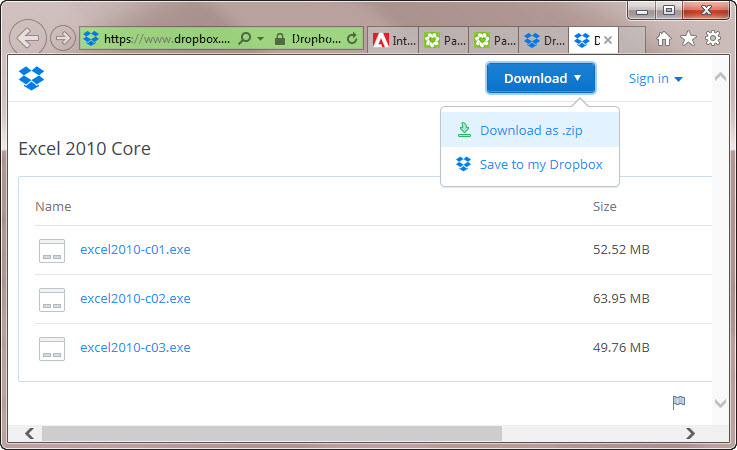
2. When the Dropbox page opens, click on either the Download button or on one of the named program links (such as excel2010-c01.exe in the image below).
Clicking the Download button gives you the option of saving all items in the folder as a .zip file or to a Dropbox folder if you have one.
Clicking a link lets you save that file to your local Downloads folder.
3. If you saved the items as a .zip file, you need to unzip the archive to a location of your choice. To do so, right-click the archive and select Extract All, or use an unzip utility you have installed to do so. If you saved the files individually to your Downloads folder and select then move the files to the destination of your choice on your computer.
NOTE: ALL files from a given program MUST be located in the same place for our programs to run properly (you can’t have the .exe file in one location and any other files or folders in another location).
Installation for Windows 8 or 10
Some of our programs were created prior to the release of Windows 8 or 10. If you are experiencing problems when you attempt to load the program, please follow the instructions below.
Error received when installing on a Windows 8 or 10 machine
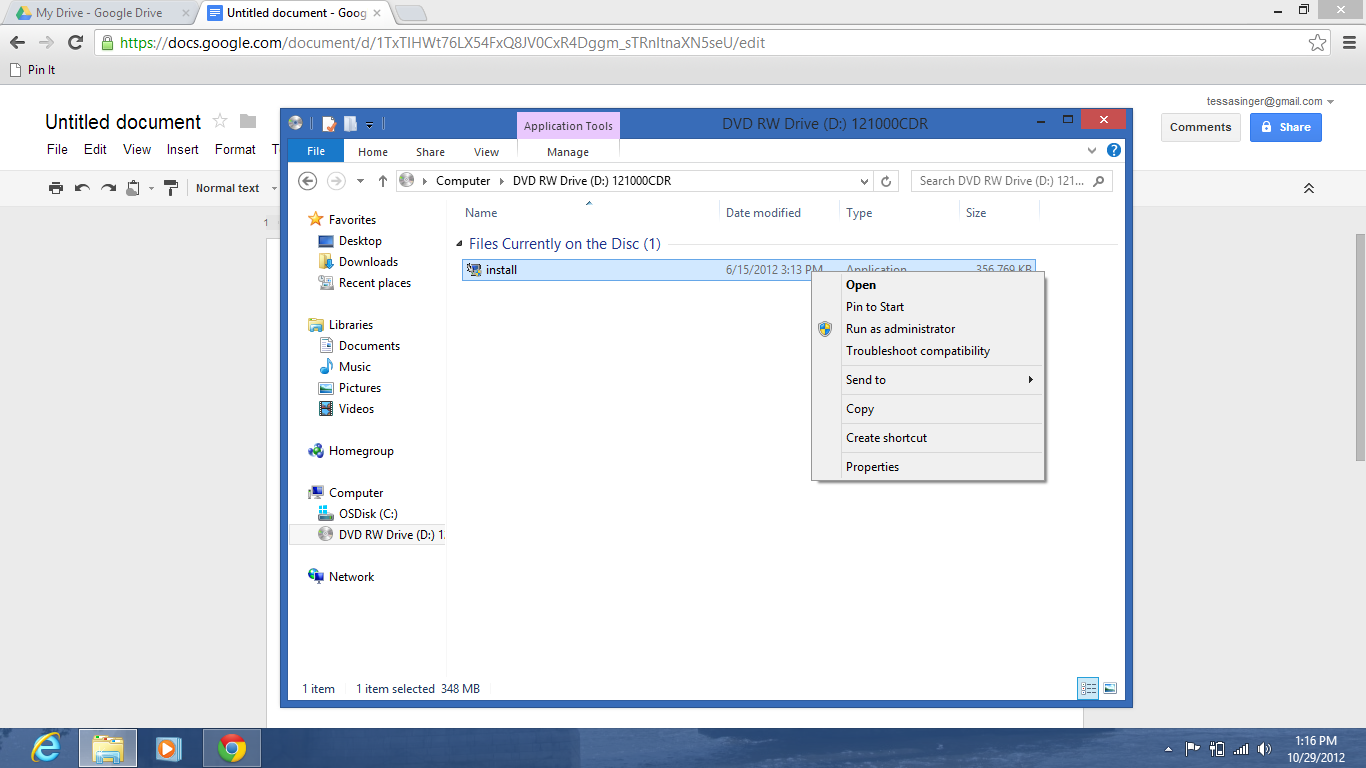
Right-click on the installation file and select properties.
Click on the Compatibility tab.
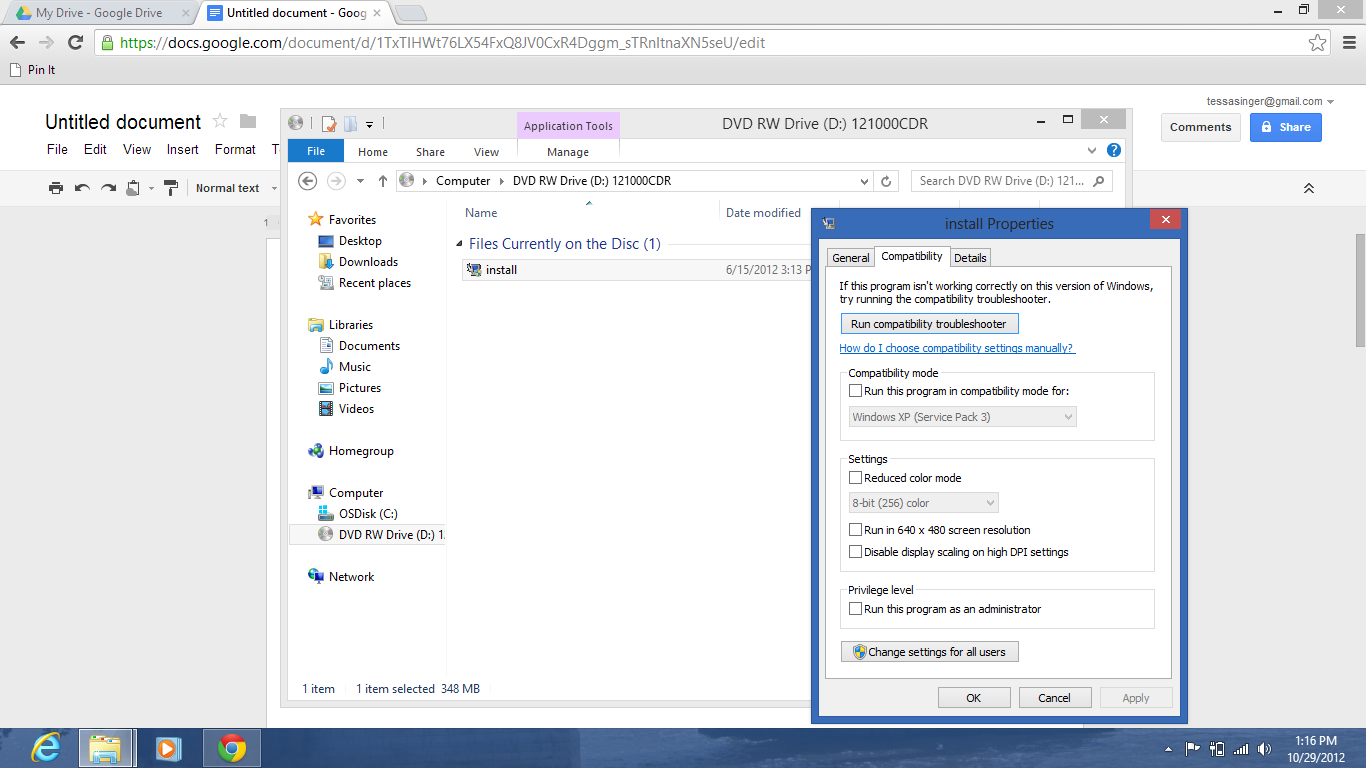
Check the box under Compatibility Mode for Run the program in compatibility mode for:
Then select Windows 7 from the drop-down (if that doesn’t work, try XP (Service Pack 2)).
WEBSITE SECURITY
ENCRYPTION AND SECURITY
SSL encryption ensures that transaction information is sent securely but has a significant performance trade-off in the browser environment. You may have noticed that our website employs frames for easier navigation and more efficient page updates. With this in mind, we selectively place SSL encryption only on those forms and frames that need to be encrypted (i.e., when the credit card information is requested). Since things like our navigation buttons and menus do not need to be slowed down by SSL, we do not employ it there.
Unfortunately, (but for obvious reasons) browsers will not show the safe “key” or “lock” unless each and every frame on the page is SSL encrypted. Thus, if only one frame is encrypted, the browser correctly reports that not everything you are looking at is “safe.” However, the absence of the “lock” or “key” does not mean that the information you are looking at is not encrypted.
You can verify that a frame is SSL encrypted by right-clicking within the frame and looking at the frame info or properties (i.e., found in the address bar on Chrome and the “File” menu in Internet Explorer). Doing this when the credit card information is requested will indeed show that this information is being sent encrypted and any security concerns you may have should be relieved.
To protect our members, we use Secure Socket Layer (SSL) technology to encrypt the credit card information you send when you place your order. The information is encrypted on your computer, sent through the Internet as scrambled code, and decoded on a secure server. It cannot be read in transit. SSL is the recognized industry standard worldwide for such sensitive transactions, making it safe for you to shop with a credit card on the Internet. Even banks transfer money and complete credit card transactions using this secure method.